

Transfer Policy & Rules
Every program carries a Transfer Policy that decides which transcript courses are even eligible to transfer, before matching happens. The policy lives on the program’s detail page (Institution › Programs › your program) and is editable by Managers and above — click the edit toggle on the Transfer Policy card.
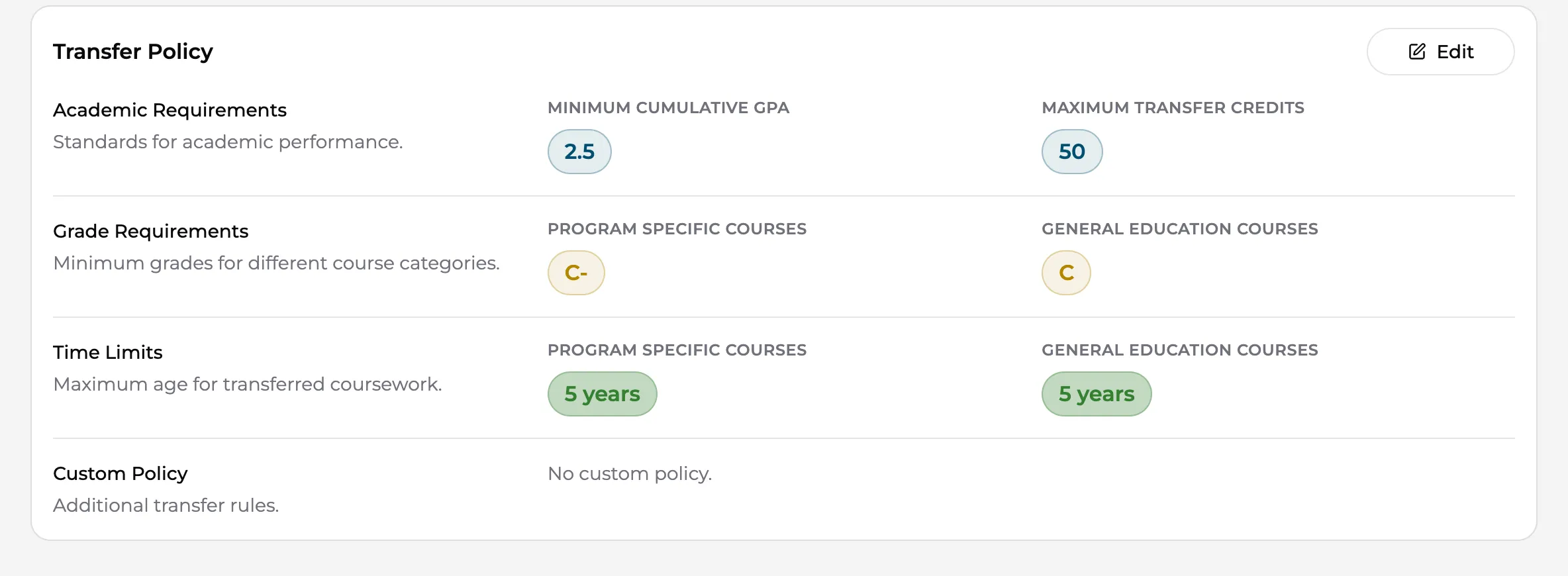
Policy fields
Section titled “Policy fields”Academic Requirements
- Minimum Cumulative GPA — the student’s overall GPA must meet this for coursework to transfer.
- Maximum Transfer Credits — a cap on total credits the program accepts. Leave blank for unlimited.
Grade Requirements — set separately for the two course types:
- Program Specific Courses — minimum grade for courses that map to the program’s core requirements.
- General Education Courses — minimum grade for gen-ed coursework.
Time Limits — also split by course type:
- Program Specific Courses — maximum years since the course was taken (clinical and technical content ages fast).
- General Education Courses — a separate, usually longer, limit. Leave either blank for no limit.
Custom Policy — free text for anything your evaluators and the AI should consider that structured fields can’t express (articulation notes, specific exclusions, department quirks).
How the policy is applied
Section titled “How the policy is applied”When an evaluation runs, each extracted transcript course is checked against the policy. Courses that pass appear under Eligible courses on the review page; courses that fail appear under Ineligible courses with the reason.
Two override paths exist, both requiring an explicit human decision:
- Per-course: an evaluator can allow a transfer for an individually blocked course.
- Per-evaluation: the work experience exception waives the Maximum Years Since Taken limit for a student whose work experience keeps old coursework current.
Rules and Past Rules
Section titled “Rules and Past Rules”Beyond the policy card, the program’s Rules tab holds evaluation rules — reusable decisions about how specific courses or situations are handled. Add or remove rules as your articulation practice evolves.
The Past Rules tab is a read-only archive: when rules change, the old ones remain visible so that historical evaluations stay explainable. Nothing there affects new evaluations.